The “actually use the thing” release
v1.0 through v1.2 were architecture releases. v1.0 set the foundations down. v1.1 turned chippy into a
debug-adapter server with an NES variant and seeded nessy. v1.2 promoted the library to public, cycle-accurate’d
the NES path, and carved nessy out into its own repo. By the time the dust settled, chippy had a fairly large
surface area — TUI, DAP server, DAP client library, an in-process and a wire transport, a public 6502 library,
a working Source-abstracted backend interchange — but I had spent so much time building the surface that I
hadn’t done much actual debugging with it.
v1.3 is the release where I sat down and used my own tool for a long uninterrupted stretch. Every feature in v1.3
is a thing I went looking for and didn’t have. The release notes are unglamorous: conditional breakpoints, a
:mem poke command, watch-array expansion, trace-replay search and side-by-side diff, deep rewind via keyframes.
There are no new architecture diagrams. There’s no protocol surface I added or carved. The thesis is “this
debugger has rough edges; smooth them.” The amount of work that turned out to be is a useful object lesson.
Conditional breakpoints, finally carrying their condition
The DAP spec has had conditional breakpoints since the beginning. You pass a condition string with your
setBreakpoints (or setInstructionBreakpoints) request, and the debug adapter is supposed to evaluate the
condition on each hit and only pause if the condition is true. The TUI had a local version of this since
v0.4.0: you could :bp $C123 if X == 5, and the TUI’s continue loop would re-check the condition against the
in-process CPU state at each hit and skip the ones that didn’t match.
The problem with the local-only flavor is that it doesn’t survive the remote case. When chippy is attached to a
running nessy over DAP, the breakpoint hit happens in nessy’s process, the CPU state lives in nessy’s process, and
the TUI only finds out about it after a round-trip. So a conditional breakpoint set to Y == $30 && PC == $C123
would:
- Hit in nessy.
- Send a
stoppedevent over the wire. - The TUI pulls full state via
variables. - The TUI evaluates the condition.
- If false, the TUI sends
continueand goes back to (1).
That round-trip is slow — single-digit milliseconds in the best case, tens of milliseconds when memory mirroring has to refresh. A condition that filters one hit in a hundred can take several seconds to advance past a stretch of hits that would have been single-digit microseconds on the server.
v1.3.0 forwards the condition over DAP. RemoteSource.SetBreakpoint now sends the breakpoint with its
condition, hitCondition, and logMessage fields populated, and chippy’s DAP server compiles each into an
expr.Expr at set time. The hit-side evaluation runs on the server against fresh CPU state under cpuMu, so a
non-matching hit short-circuits without a TUI round-trip. The TUI only sees the hits that mattered.
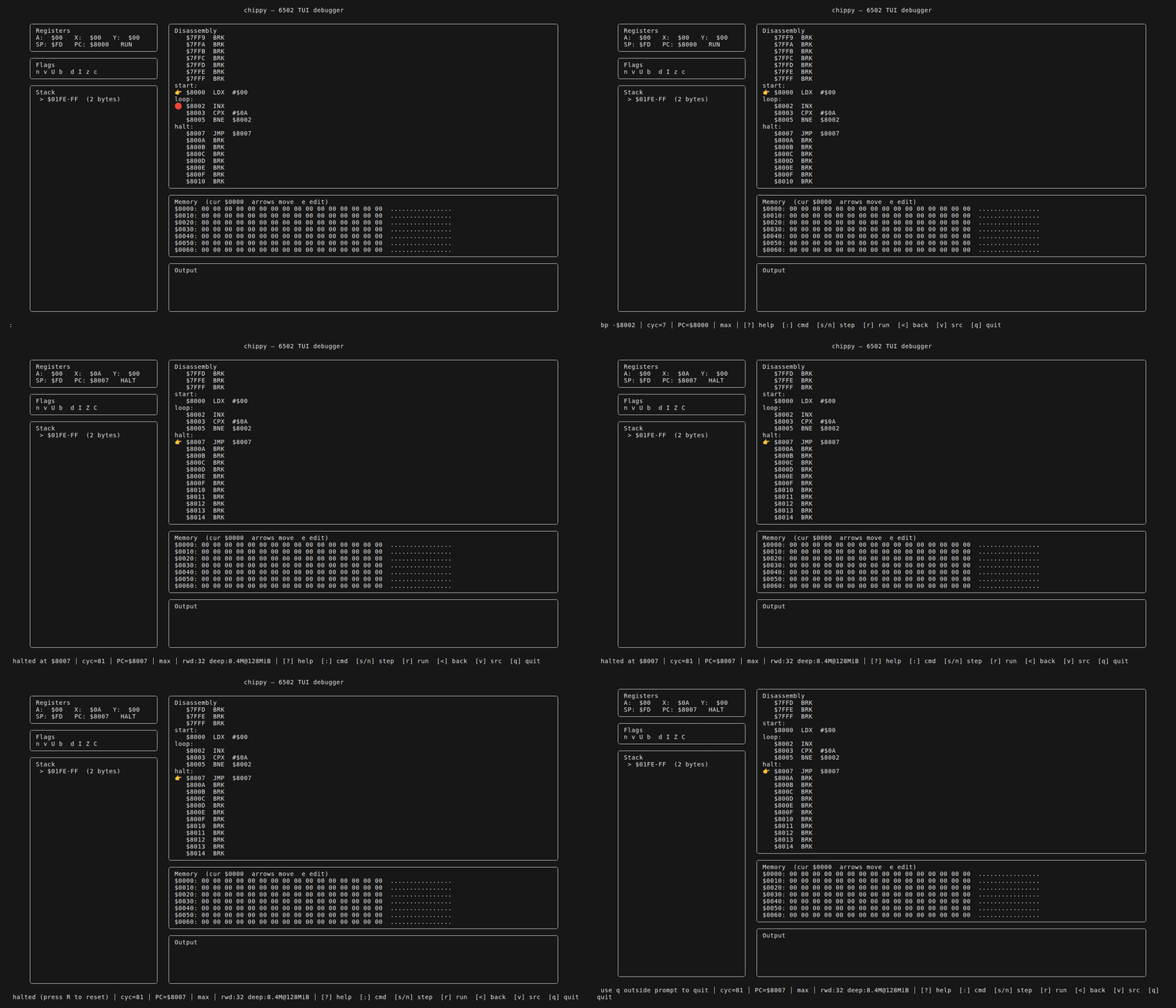
I also gave the BP modal a c keybind that pops a one-line condition editor — same expression language, same
evaluator, same expr package the watch panel uses. The unified language is the small detail I’m most pleased
about: a TUI watch [$F004] == 'q' is exactly the same expression as a breakpoint condition [$F004] == 'q',
which is exactly the same expression as a :find [$F004] == 'q' against the trace log (more on that below).
Three call sites, one parser.
There’s a subtle accounting question that came up while writing this: hit counts. If the server short-circuits
a non-matching hit, does the hit count on the breakpoint advance? The DAP spec is ambiguous. I made it
advance — the hit count tracks total hits, the condition tracks which of those should pause — because the
alternative (“hit count only counts hits that paused”) makes hitCondition essentially the same as condition
and means you can’t write pause after the 30th hit regardless of condition, which is a useful thing. The
emoji distinction (🔶 rejected) shows up in the BP panel for visited-but-not-paused, so you can tell which
breakpoints are doing real filtering and which are duds.
:mem and the bus-write contract
Up through v1.2 there were three places in the TUI that wrote to memory:
- The memory-editor modal (hex-edit a cell, press enter, the byte changes).
- The DAP
writeMemoryhandler (for remote pokes). - The state-load path (when reloading a saved state).
Two of these wrote through the bus, meaning the write went tui.WBus → cpu.MMIO → cpu.RAM, dispatching to
peripherals first, falling back to RAM. One of them — the memory-editor modal — wrote directly to
cpu.RAM.Data[], because the code had been written before MMIO was a thing and never updated.
This meant a TUI memory edit had subtly wrong semantics. If you edited a byte in the MMIO range ($F001 for the
text-output peripheral on chippy’s default machine, $2000-$2007 on an NES), the write didn’t go through the
peripheral — it landed straight in the RAM shadow underneath, where the peripheral wouldn’t see it. That’s fine
for most addresses, but it meant a watchpoint set on $F001 wouldn’t fire from a TUI memory edit, because the
watchpoint plugs into the bus and the edit had bypassed the bus.
v1.3.0 routes TUI memory writes through the bus. The mechanical change is a one-line difference (bus.Write not
ram.Data[i] = b); the consequence is that TUI pokes now behave exactly like CPU writes. Watchpoints fire on
them. Peripheral side effects fire on them. The TUI’s poke is just another CPU write to everything downstream
of the bus.
The new :mem command is the surface for this. The syntax is :mem $ADDR V [V ...] — same as the memory-editor
modal, but as a command, so it composes with the prompt history and the reverse-i-search the v0.0.2 release added.
You can type :mem $0200 01 02 03 04 and four bytes write through the bus in order. The atomicity contract is
“each write is independent, peripherals see them one at a time, watchpoints fire individually” — there’s no
attempt to batch them, because the bus doesn’t.
The cc65 .dbg finding I have to write a whole section about
This was the surprise of v1.3, and it reshaped the watch-expansion feature.
The plan going in was to expand structs and arrays in the watch panel by reading .dbg type information. cc65
writes a .dbg next to its .o files; the file contains symbols, file map, line map, and — supposedly — type
records (csym). The chippy symbols package already parsed the symbol table and the line map, so adding type
expansion was supposed to be “parse a few more record types and walk the resulting tree.”
So I sat down with the cc65 v2.18 source and read the format spec, and I ran it against a small ca65 program that defined a struct, and I parsed the output, and the type records were all… void.
Every csym record in the .dbg, every single one, had its type field set to “void.” No struct member layout.
No array bounds. No element types. No information that would let me reconstruct an array of byte or a struct
with three fields. cc65 v2.18 just doesn’t write that into the .dbg. There’s a comment in the cc65 source from
2003 acknowledging this, with a note that it would be added “later.”
This is the kind of finding that, if you don’t write it down, you spend an hour rediscovering every time you
revisit the feature. So the first thing I did was add a memory entry — reference-cc65-dbg-no-types — that
states bluntly: cc65 v2.18 does not emit struct member layout, array bounds, or non-void type information in
.dbg. The note links to the cc65 source and the empty record. This is now the first thing future-me hits when
I think “can we expand structs from .dbg?” because the answer is no.
The honest scope-reshape: watch expansion in v1.3 became array-only, best-effort.
:watch X xN          # N consecutive byte elements at the symbol X
:watch X word xN     # N consecutive word elements at X
:watch myBuf x16     # 16-byte expansion of myBuf
If the symbol has a known size from the .dbg (sym size=), it auto-seeds the count when the user omits xN.
Otherwise the user supplies the size. The watch panel renders each element on its own row, indexed.
Watch.Count is an optional v1 state field (omitempty), so the state-format contract from v1.0 stays
unchanged — no schema bump, the golden file still loads.
Struct expansion is deferred, not abandoned. The v1.6 release ships a manual struct-overlay watch syntax
(:watch X as {hp:byte, x:word, y:word}) that lets the user declare the layout instead of reading it from
.dbg. That’s the right scope: if the debug-info format doesn’t carry it, you can either (a) reverse-engineer
the layout from naming heuristics and hope, (b) write a separate .layout sidecar file, or (c) let the user type
the shape into the watch command. (c) is the smallest, most honest version, and it’s what v1.6 ends up shipping.
The takeaway I want to commit to the postmortem: when a third-party format turns out not to carry the information you assumed it would, write down the finding, reduce the feature scope to what’s actually possible, and don’t ship a worse version of the feature you wanted to ship just because you’d already started. Honest scope-reduce is a victory; pretending you have type information you don’t have is technical debt with side effects.
Trace-replay: search, jump-to-cycle, side-by-side diff
The execution-trace work from v0.0.2 (-trace PATH / :trace writes a buffered log of every step; replay mode
parses the log into navigable frames) was a tool with a known sharp edge: once your trace was longer than a few
thousand instructions, finding the moment something went wrong was a manual scroll through a sea of lines.
v1.3.0 fixes this with three additions, all of which live in pure trace package logic (no TUI dependency, so
they’re unit-testable on their own).
:find EXPR and :rfind EXPR
:find walks forward through trace frames, evaluating EXPR against a scratch CPU per frame and stopping at the
first match. :rfind walks backward. The expression grammar is the same expr package used for breakpoint
conditions and watches — with one ergonomic shim. The user types :find A = $FF not :find A == $FF because
a single = is what humans type, the parser sees = in expression context and treats it as ==, and the trace
search “just works.” This is a tiny ergonomic concession (probably one or two characters of typing saved per
search) but it makes the feature actually pleasant to use, which is the whole point.
:cycle N
The trace log has a monotonic cycle column. :cycle N does a binary search and jumps directly to that cycle.
This is one of those features that costs about ten lines of code (sort.Search against a slice of cycle counts)
and changes how you use the tool. Before :cycle, you scrolled. After :cycle, you compute the cycle of an event
from a separate log and jump straight to it.
:diff and side-by-side replay
This is the one I was the most uncertain about and ended up using the most. You run the same program through
chippy twice with -trace. You feed one of them into the TUI with :trace and the other with -diff PATH. The
trace package computes the first divergence — the first frame where the two CPU states disagree — and the TUI
marks it. Press d to toggle a side-by-side overlay that renders both trace frames at once: PC, A, X, Y, SP, P,
the next-to-execute opcode. Press D to toggle the per-step diff highlighting.
The thing this is for: regression bisection. You change something in the core, you run a ROM, you save the
trace, you change something else, you run the same ROM, you :diff the two traces. The first divergence is the
exact cycle the regression bit. The side-by-side shows you the register state at that cycle in both worlds, and
you can step backward to see what led to it.
I cannot count the number of debugger sessions this would have saved me earlier in chippy’s life. It’s the kind of feature I wish I’d shipped at v0.0.3. The fact that it’s possible at all is downstream of the v1.0 decision to make execution traces a thing — D7 of the v1.0 ADR — and the cost of adding it post-hoc was, I want to say, two hundred lines of code over a weekend. Building the trace log was the load-bearing investment. Everything since is leverage on it.
Deep rewind via keyframes
The reverse-step feature has been in chippy since the start. D10 of the v1.0 ADR: each Step pushes a
Snapshot (a page-level CoW delta of RAM + the register file + the peripheral state) to a fixed-capacity
SnapshotRing. < pops one off and restores. The ring is a small number of kilobytes, which gives you a few
hundred steps of rewind history.
A few hundred steps is great. It’s also, sometimes, not enough. You’re chasing a bug that manifests as a glitched sprite three frames after a specific scroll write. Three frames is roughly 89400 CPU cycles on NTSC NES, which is roughly… ten thousand instructions, give or take, depending on what’s running. The snapshot ring tops out at a few hundred. The bug is unreachable through pure reverse-step.
The fix: a second ring. cpu.KeyframeRing keeps periodic full-RAM snapshots every 4096 steps. When you hit
:rewind 50000, chippy finds the nearest keyframe before step 50000, restores it, and replays forward to the
exact step. Because the per-step snapshot ring is still doing its thing, the last 4096 instructions of the
keyframe-to-target replay also populate the snapshot ring, so you can reverse-step normally from the rewound
position.
The replay assumes the execution between keyframes is deterministic, which it is for chippy’s machine model (buffered input is part of the snapshotted state). For nessy, the same machinery works because nessy’s input is snapshotted at the keyframe — the joypad state, the controller buffers, all of it.
The other half of the design is the budget. Storing a full RAM snapshot every 4096 steps is 64 KiB per keyframe. At a clip of one keyframe per 4096 steps, you fill 1 MB of memory every 64K steps, and on a non-trivial program you can blow past your memory budget in seconds.
:rewind-budget MB caps it. The budget is a ceiling, not a reservation — the ring discards the oldest keyframe
when adding a new one would exceed the budget. Your reach is the budget divided by 64 KiB times the keyframe
interval. At 16 MB, you get about a million instructions of reach. At 64 MB, four million. The actual numbers are
rendered in the TUI’s keyframe panel so you know what you’ve got.
The thing I find delightful about this design is that the rewind cost stays constant. Regardless of how far back you rewind, the replay cost is at most one keyframe interval — 4096 instructions, which is roughly a millisecond of CPU time. So a deep rewind feels instant. It’s an O(1) operation hiding behind an O(N) interface.
What’s actually in v1.3.0
Lining the release up against the changelog:
- Conditional breakpoints (
condition,hitCondition,logMessage) forwarded over DAP; BP-modalckeybind for inline condition editing. :memcommand + memory writes routed through the bus so watchpoints + MMIO side effects fire.- Watch-array expansion (
:watch X xN,:watch X word xN); cc65.dbgno-struct-types finding documented; manual struct overlay deferred to v1.6. - Trace replay:
:find EXPR/:rfind EXPRforward/reverse search;:cycle Nbinary-search jump;-diff PATHwith side-by-side overlay (d/D). - Deep rewind via
cpu.KeyframeRing(periodic full-RAM snapshots, 4096-step interval);:rewind-budget MBcaps memory; reach scales linearly with budget; replay deterministic.
And one thing that is not in v1.3.0 that I want to flag, because the v1.4 post is about it: the VS Code
extension. v1.3.0 still ships the extension, and the extension’s marketplace publish is still failing in CI
because Dependabot keeps bumping @types/vscode above the engines.vscode floor and vsce won’t publish. I
keep manually re-pinning the dependency in the release branch and the next Dependabot cycle bumps it again. I
have not yet decided what to do about this. By the next release I will have decided.
A word on the meta-pattern
The thing I want to extract from v1.3 is that it’s a release with no new architecture. Every feature plugs into a
seam that was already there. Conditional breakpoints ride the DAP protocol’s existing condition field. The
:mem bus-write change rides the cpu.WBus / cpu.MMIO chain that was there since v0.0.1. Trace search and
side-by-side ride the trace-log format from v0.0.2. Deep rewind reuses the page-level CoW shadow from v0.0.1.
If v1.0–v1.2 was “build the surfaces,” v1.3 is “land features on top of the surfaces you already have, in the shape the surfaces want.” There are points in a project’s life where the right move is to add a surface, and points where the right move is to use the surfaces you’ve got. The hard part isn’t always knowing which is which — it’s resisting the urge to add yet another surface because it’d be more satisfying than working on the things that the existing surfaces could host.
If v1.4 had been “add another surface,” it would have been a more interesting release to write about. It wasn’t. The v1.4 post is about taking a surface out.
Next Friday.